What readers usually run into
- Tiny numbers
- Weak grid lines
- OCR table confusion
- Low contrast cells
Why tables need extra care
Tables rely on alignment. If cleanup shifts a column, weakens a grid line, or changes small digits, the page may look cleaner but become less useful. Table scans also often contain tiny numbers that are easy to damage with aggressive contrast changes.
Specify layout preservation
Your prompt should say to keep row alignment, column widths, grid lines, and handwriting unchanged. Ask for clearer text and background cleanup without table extraction, reformatting, or interpretation.
Review small values
After generation, zoom into the smallest numbers, totals, decimal points, check marks, and handwritten notes. Compare suspicious values against the original before exporting.
What this is not
This workflow does not convert a scanned table into Excel, CSV, or editable cells. It produces a cleaner image-based PDF page for reading, sharing, or later OCR with a dedicated tool.
Before and after evidence for tables
The best before and after comparison is a local zoom on the densest part of the table. Check row labels, small numbers, decimal points, grid intersections, and handwritten ticks. A clean-looking page is not enough if a faint vertical rule disappears or a decimal point becomes ambiguous. For tables, usefulness depends on preserving structure as much as improving contrast.
How to phrase table prompts
Use language that forbids restructuring. Ask to preserve row alignment, column widths, grid lines, and all values. If the table has handwritten marks, mention them. If it has formulas or footnotes, mention those too. Avoid prompts that say "recreate," "extract," or "convert" unless you are using a different tool designed for data extraction.
When OCR or spreadsheet tools come later
If your final goal is spreadsheet data, first create the clearest faithful scan you can, then use a dedicated extraction workflow. Keep the cleaned image as a reference because table extraction often makes mistakes in merged cells, blank cells, and repeated headers. RedesignPDF helps create a readable source image; it does not validate the extracted data.
Table-specific export checklist
Before exporting a cleaned table, inspect the first row, last row, narrowest column, and any cells with small decimals or handwritten corrections. Check whether grid lines still separate values clearly. If the table spans multiple pages, confirm that headers and repeated labels remain consistent. A cleaned table page is successful when it is easier to read without making the reader wonder whether the structure changed.
Example prompt for scanned tables
A table prompt should be strict: "Clean the scanned table, reduce gray background, strengthen small numbers and grid lines, preserve row alignment, column widths, handwritten marks, and all values." Add "do not extract, convert, or reinterpret the table" if there is any risk of confusion. This wording keeps the task visual and helps avoid changes that would make the table look cleaner but less reliable.
Related example to compare
Use a scanned table example to judge whether the after image preserves structure. The grid should still guide the eye, small values should stay separated, and handwritten marks should not become noise. If a result changes the apparent structure, it is not acceptable even if the page background looks cleaner. Accuracy matters more than visual neatness, especially for financial or scientific tables. Recheck totals manually before export or OCR, then keep the original scan.
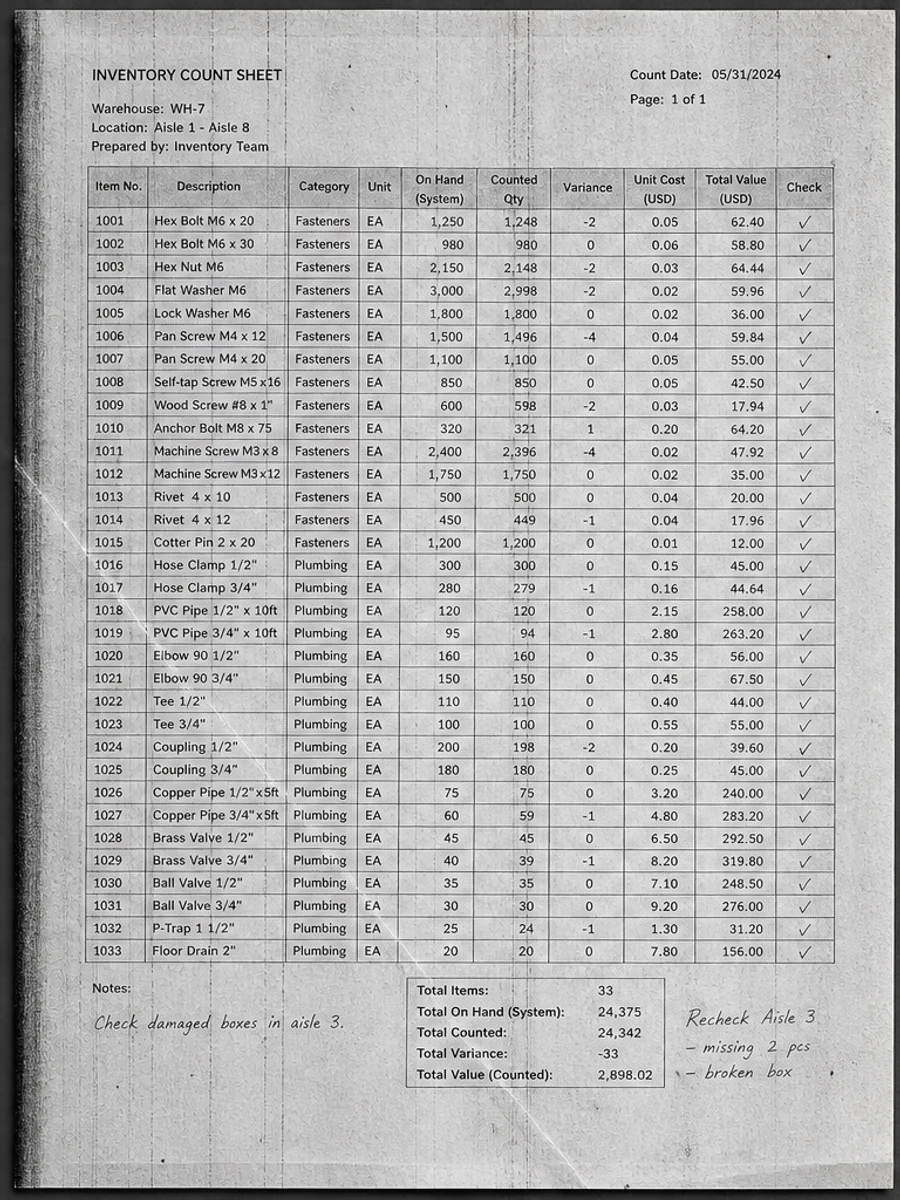
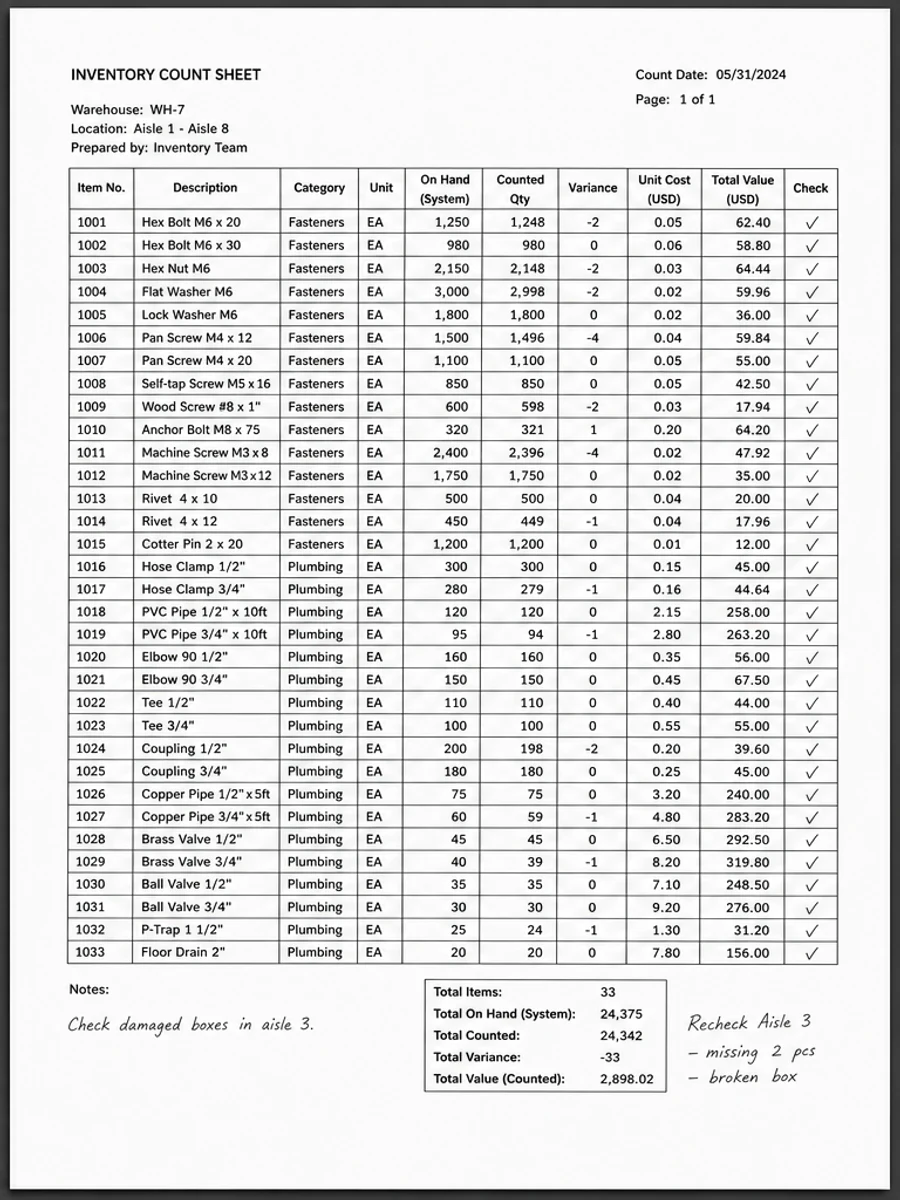
Inline before and after example: Clean a scanned table without changing layout
Step-by-step tutorial
- Clean a sample table page.
- Ask to preserve rows and columns.
- Improve grid and number contrast.
- Avoid table extraction claims.
- Review small values.
- Export a visual PDF.
Prompts you can paste
01Clean this scanned table while preserving row alignment, column structure, grid lines, tiny numbers, and handwritten marks.
02Improve contrast on the table scan, reduce gray background, and keep all values, spacing, borders, and layout unchanged.
03Use conservative cleanup only. Do not extract the table, do not convert it to spreadsheet data, and do not reinterpret numbers.
When RedesignPDF is a good fit
- Scanned tables with visible but weak numbers
- Forms with grid lines and handwritten marks
- Academic or office tables needing cleaner visual review
When it is not the right tool
- Converting tables to spreadsheets
- Guaranteed numeric accuracy without review
- Changing row or column structure
Common mistakes
- Asking the AI to recreate the table instead of preserving it.
- Missing decimal points after cleanup.
- Letting thin grid lines disappear during background whitening.
Related reading
FAQ
Can RedesignPDF convert scanned tables to Excel?
No. It improves the visible page image. Use a separate OCR or table extraction tool if you need structured data.
How do I protect small numbers?
Mention tiny numbers, decimal points, and grid lines in the prompt, then review them closely before export.
Will the table layout stay the same?
The prompt should request unchanged layout, but you still need to compare the output with the original.
Conclusion
If your goal is a clearer scanned PDF while keeping the original layout, start with a conservative prompt, process one page, and review text, tables, numbers, handwriting, and stamps before exporting. If you need editable text, PDF-to-Word conversion, form filling, or precise text-layer editing, use OCR, a PDF editor, or a better rescan instead.
Upload scanned PDF