حالات شائعة
- اصفرار الورق
- بقع وتلف مياه
- نص باهت
- أختام وعلامات قديمة
Why archive scans are different
Old documents may contain yellowing, foxing, water marks, folds, stamps, marginal notes, and fragile paper texture. Some of those marks are noise for readability, but some are context. A prompt that removes every imperfection can make the result misleading.
Use a preservation-first prompt
Ask for darker readable text and reduced background distraction, but explicitly preserve stamps, handwriting, signatures, margin notes, and document structure. The cleaned page should remain recognizable as the same archive scan.
Good fits
This works for old letters, typed archive pages, family documents, historical packets, and scans where readability matters more than pristine appearance. It should not be used to claim professional conservation or forensic restoration.
Keep originals
Always keep the original scan. Use the cleaned PDF as a reading copy, and compare it with the original before quoting names, dates, places, or archival details.
How to decide what counts as noise
Archive scans are not ordinary office scans. Foxing, stamps, folds, water marks, and paper tone can be part of the document story. Before cleanup, decide what you want to reduce and what must remain. A good prompt can say "reduce distracting stains" while also saying "preserve stamps, notes, signatures, and paper character." That balance is more honest than asking for a perfectly clean page.
Before and after review for old documents
Review proper names, dates, place names, marginal notes, seals, and faint type. These details are often exactly what makes an archive page valuable. If the after image improves paragraph readability but weakens a stamp or handwritten note, decide which matters more for the use case. For research or family history, preserving context may be more important than visual neatness.
What not to claim
Do not describe the cleaned result as restored, authenticated, or historically corrected. It is a generated visual improvement for reading. If the document has legal, archival, or scholarly importance, keep the original scan attached to your workflow and label the cleaned copy as an enhanced reading version. That avoids overstating what visual cleanup can prove.
How to document the enhanced copy
For archives, family records, or research notes, keep a simple record of what changed: background reduced, text darkened, stains softened, or shadows cleaned. Store the original and enhanced PDF together. This makes it clear that the cleaned version is a reading aid. It also protects future readers from assuming that faint marks, missing details, or generated contrast choices are part of the original document.
Example prompt for archive scans
Use preservation language: "Conservatively improve readability, darken weak type, reduce distracting stains, and preserve paper tone, stamps, signatures, marginal notes, folds, and layout." Avoid words like "restore perfectly" or "remove all aging." Old document scans need a balance between readability and context. The cleaned copy should help someone read the page while still making it obvious that the source is historical.
Related example to compare
An old-document example should be judged by trust, not just cleanliness. The after image may reduce yellowing and make text easier to read, but stamps, folds, and marginal clues should remain. If the cleaned page looks disconnected from the original artifact, the prompt has gone too far. Preserve context even when reducing distraction, and keep the untouched scan beside it for citation, review, future comparison, and source transparency over time, especially in research, archives, or family records. Label the enhanced copy clearly before sharing it publicly.
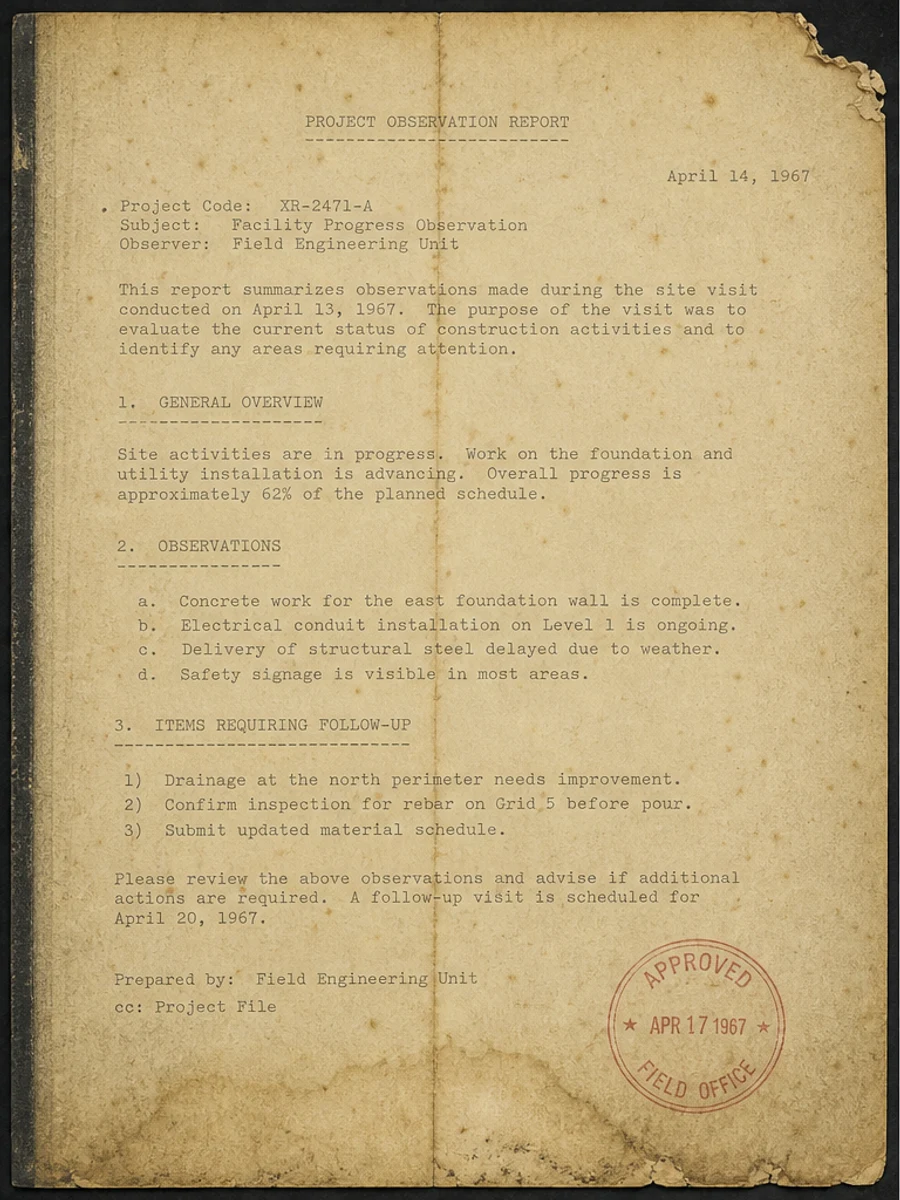
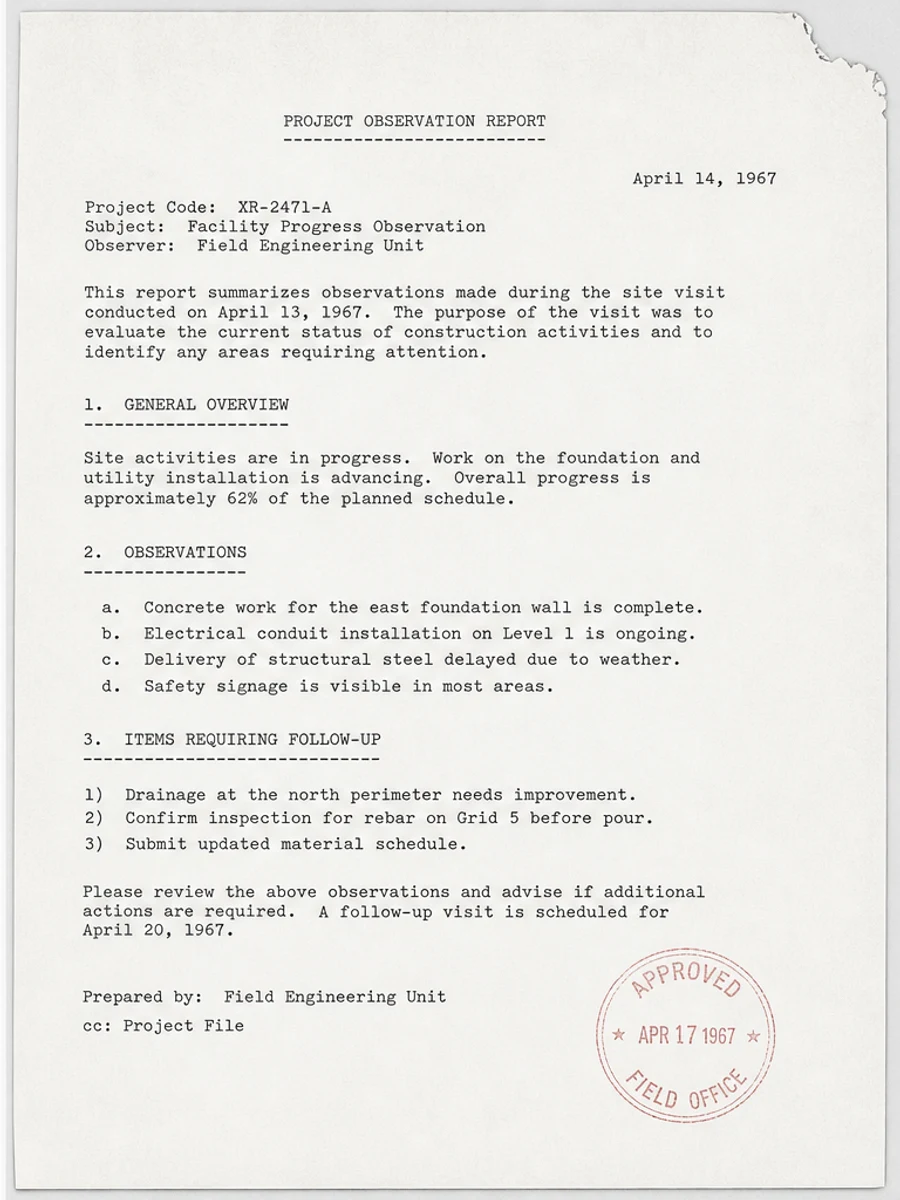
قبل وبعد: Improve an old document scan
خطوات العمل
- افتح ملف PDF الممسوح ضوئيا.
- اختر الصفحة التي يظهر فيها «تحسين مسح مستندات الأرشيف القديمة» بوضوح.
- استخدم أمر تحسين متحفظ للوضوح.
- قارن الصفحة قبل المعالجة وبعدها.
- تحقق من النصوص والأرقام والتواريخ والجداول المهمة.
- صدّر الملف بعد التأكد من النتيجة.
أوامر جاهزة للاستخدام
01نظّف صفحة PDF الممسوحة ضوئيا مع التركيز على تحسين مسح مستندات الأرشيف القديمة، وقلّل الخلفية الرمادية والظلال والبقع، واحتفظ بالتخطيط الأصلي كما هو.
02حسّن الوضوح بشكل متحفظ: قوِّ النص الباهت ونظّف الخلفية، مع الحفاظ على الكتابة اليدوية والأختام والجداول والعلامات.
03أعد إنتاج هذه الصفحة الممسوحة ضوئيا بصورة أوضح، دون تغيير النصوص أو الأرقام أو مواضع العناصر.
متى يناسبك RedesignPDF
- صفحات PDF الممسوحة ضوئيا التي ما زال نصها مقروءا.
- المستندات المصورة التي تحتاج وضوحا بصريا أكبر.
- الملفات التي يكون الهدف منها تحسين القراءة لا تعديل النص.
متى لا يناسبك RedesignPDF
- تعديل طبقة النص في PDF بدقة.
- تحويل PDF إلى Word أو استخراج بيانات آلي.
- المستندات الرسمية التي تحتاج تحققا قانونيا أو أرشيفيا.
Common mistakes
- المبالغة في التبييض حتى تختفي الخطوط الرفيعة والعلامات الفاتحة.
- الخلط بين التنظيف البصري وتحويل OCR.
- التصدير قبل مراجعة الأرقام والتواريخ والجداول والكتابة اليدوية.
اقرأ أيضا
FAQ
هل يمكن لـ RedesignPDF معالجة تحسين مسح مستندات الأرشيف القديمة؟
نعم، عندما تكون الصفحة صورة ممسوحة ضوئيا والهدف تحسين الوضوح البصري. راجع النتيجة قبل التصدير.
هل يصبح النص قابلا للتحديد بعد المعالجة؟
لا. يعمل المحرر على صورة الصفحة ويصدّر ملف PDF مصورا؛ النص يبقى غير قابل للتحديد، وهذه ليست أداة OCR.
ما الذي يجب التحقق منه قبل التصدير؟
راجع النصوص والأرقام والتواريخ والجداول والكتابة اليدوية والأختام، لأن إعادة الإنتاج بالذكاء الاصطناعي قد تغيّر تفاصيل دقيقة.
الخلاصة
إذا كان هدفك أن تصبح الصفحة الممسوحة ضوئيا أوضح وأسهل قراءة مع الحفاظ على التخطيط الأصلي، ابدأ بصفحة واحدة وبأمر متحفظ، ثم راجع النصوص والجداول والأرقام والكتابة اليدوية قبل التصدير. أما إذا كنت تحتاج إلى تعديل طبقة النص أو تحويل PDF إلى Word أو تعبئة نماذج بدقة، فاستخدم أداة OCR أو محررا متخصصا أو أعد المسح.
ارفع ملف PDF